Creating a public map link for assets
A map link is a public URL that allows anyone opening the link to view the locations of selected assets on the map without logging in. The customer creates and manages the links directly. Previously known as Public map.
Getting started
- This feature requires the permission Map - Map links, Management.
- Users with this permission can view all company map links and edit their name and expiration, deactivate them, or delete them permanently.
- Only assets that the user already has permission to view can be added to a link. This prevents anyone from sharing the location of assets they are not authorized to see.
- If a link contains assets that the user cannot view, they cannot edit the assets included in the link. Other changes are still allowed.
Creating a link
From the management page: Map → Map links → Add new
- Name, vehicles (up to 25), and expiration.
- Select link activation and expiration.
- Once created, the link can be copied or opened immediately.
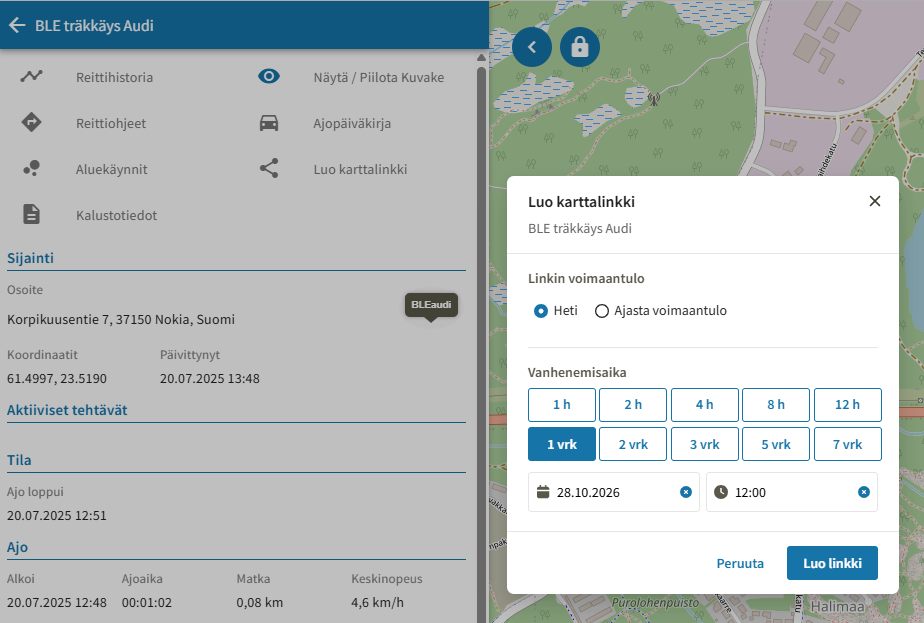
From the live map: Select vehicle → from the asset panel, select Create map link
- The name will automatically be the date, time, and registration number. The name can be edited through the link management interface.
- Once created, the link can be copied or opened immediately.
Expiration
- Quick options: 1 h, 12 h, 24 h (default), 3 days, 7 days, custom date, or Does not expire.
- Expired links are deleted automatically and permanently (every 15 minutes). They cannot be extended; a new link must be created instead.
Management
The Map → Map links table lists all created map links and allows you to edit them:
- Search by map name, vehicle name, registration number, and short name.
- Filters: status (active, disabled, expired), vehicle, and expiration.
- The Expires column shows the remaining time, e.g., "(2 h 30 min)".
- Creation date, created by, last modified, and last modified by.
- Row menu: edit, copy link, open link, disable / enable, delete.
For the link viewer
The URL format is https://v3.kiho.fi/public/mymap?map={id}&t={token}.Older links may not include a token and work with the map parameter only.
Status | The viewer sees |
|---|---|
Active | Vehicles on the map; locations update every few seconds |
Disabled or expired | "Map is currently unavailable" |
Deleted or invalid ID | "Map does not exist" |
Invalid token | "No permission" |
If a link is disabled or expires while the page is open, location updates will stop and vehicles will disappear from the map with the next update.
Vehicle not visible on the map?
- Has the vehicle been added to the link, and is it active and equipped with a tracker?
- Has the vehicle received a location?
- Is the asset set to private working status? Private trips are not shown.