
Importing refuelings from an Excel/CSV file
Specific permission "Allow importing refuelings from external data"
The import option can be found under the table actions on the Refuelings tab
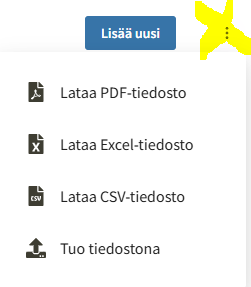
The import adds the rows from the file as new refuelings.
Importable fields:
- Assets (registration number or ID)
- Amount refueled*
- Refueling date
- Fuel (if a fuel type is assigned to the vehicle but not specified in the import file, the asset fuel type will be used for the entry)
- Description
- Unit price
- Gas station (name or address)
- Refueling identifier (ID)
- Private refueling (Company/Private)
- Full tank (Yes/No)
- Mileage (km)
- Refueler (Last name First name)
- Operating time (h)
Fields are mapped to file fields. Data formats must match those used in Kiho.
For example, fuel types must match the naming in Kiho:
- Diesel
- E10 (95)
- E5 (98)
- Fuel oil
- RE85
- AdBlue
- Electricity
- Gas
- Renewable diesel
- Renewable fuel oil
- Gas/gasoline (Bi-fuel)
Similarly, the gas station must already be set up in Kiho for the data to be mapped. The import will not create missing gas stations.