
Driving behavior report
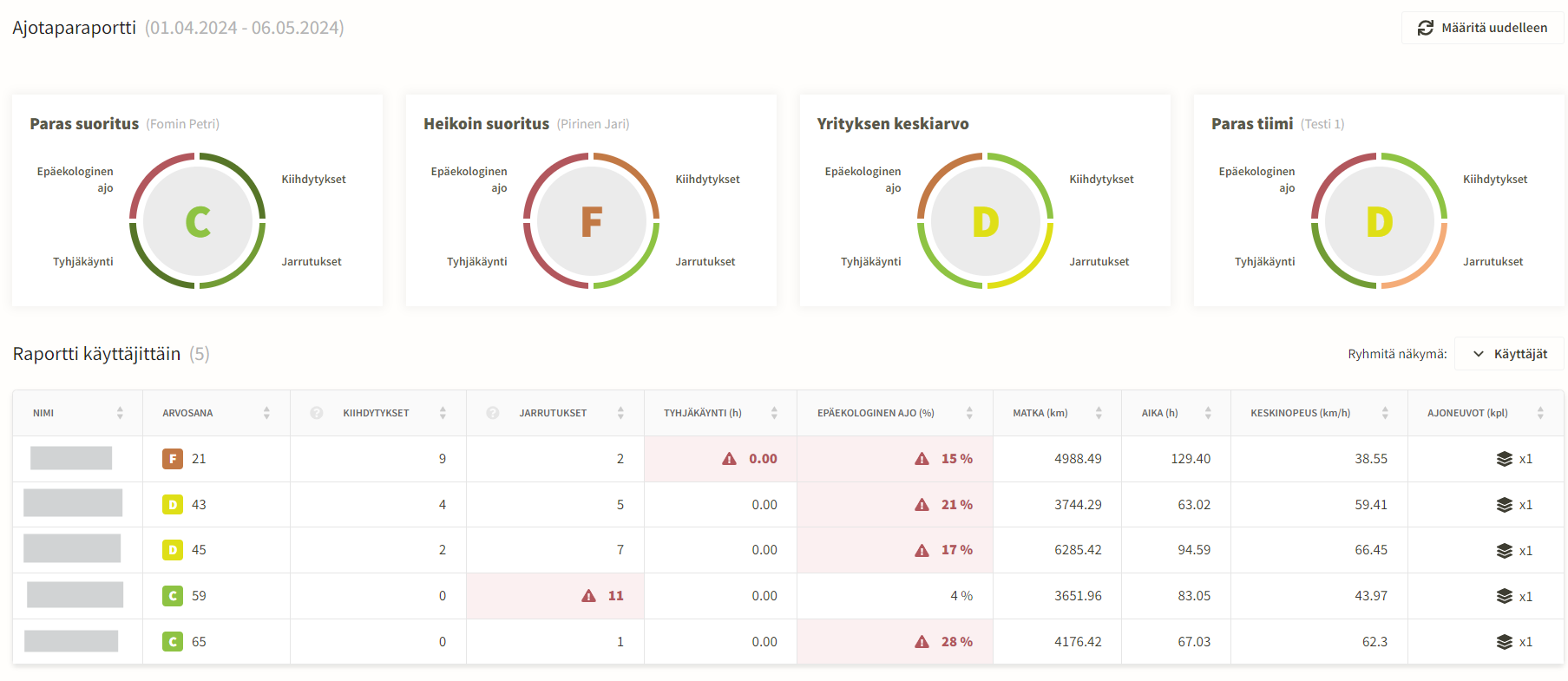
Additionally, the top of the report highlights the best and weakest driver performance, the company average, and the top team's grade.
Generating the report
The report is generated automatically once a month, so opening the report displays the most recent full month. If multiple reports have been generated, you can select the month from the month selector.
If the report has never been generated, this month selector is not visible. Instead, the home page displays the following view asking the user to generate a report. This does not affect the monthly report. The monthly report used for comparisons with previous months is created automatically once the month ends. Please note that monthly generation is not enabled until the asset type settings are properly configured in company settings.
Generating with custom settings
You can also generate the report using custom search criteria, even when pre-generated reports exist. However, comparing with previous periods is not available in this case, and generating the report for a large number of assets may take a long time. For this reason, the time range should be at most 1 month. You can access report generation from the Filter menu, which indicates if your filters require regenerating the report and if comparing with previous periods is unavailable. Please note, however, that you can filter by users, teams, and locations even with pre-generated reports. This is because these criteria do not affect the report results; they simply filter the rows shown in the report. Time period, assets, and asset types affect the results, so selecting them requires regenerating the report.
Reported information
- Accelerations – accelerations exceeding the threshold for the asset type, number (pcs)
- Brakings – brakings exceeding the threshold for the asset type, number (pcs)
- Idling – proportion of idling, %
- Inefficient driving – proportion of trips exceeding the threshold for the asset type, %
- Inefficient driving cannot be calculated retrospectively; calculation begins when the report is enabled
- Speeding
- The grade is determined by the percentage of driving done while speeding.
- If significant or severe speeding is detected during the report period, the driver’s overall grade is reduced by one or two grades accordingly.
Individual grades are calculated for each reported metric, and the overall grade is based on their average.
A driver is not shown in the report if the total driving time is less than 5 h during the selected period.
Grouping
- Users
- Teams
- Offices