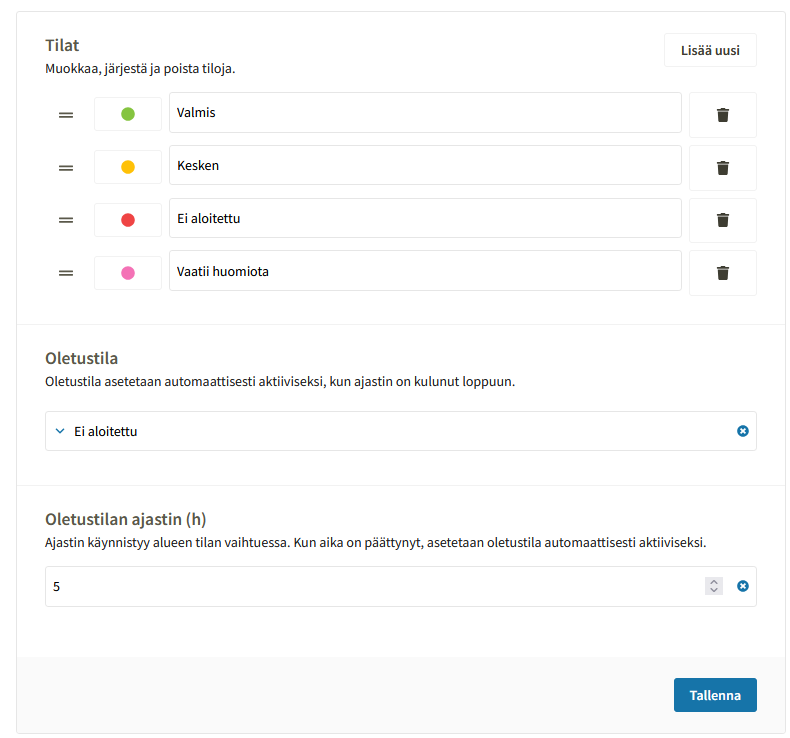
Area-based work management (Tactical Map) settings
Basic settings
Basic settings for area-based work management can be found by clicking the gear icon in the upper-right corner > Company settings > Map.
From the settings, you can manage:
- Message categories
- Area statuses
- Default status
- Default status timer
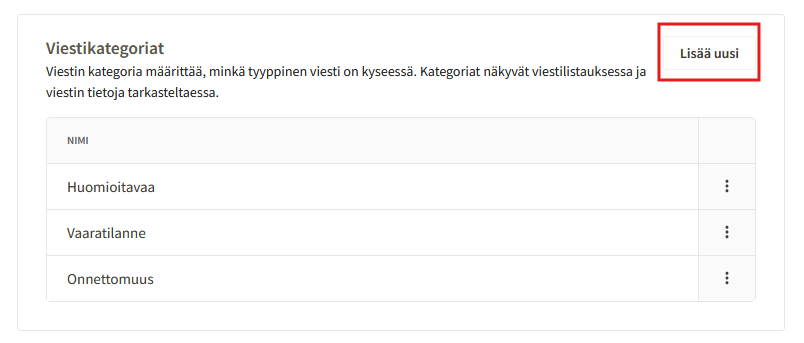
Message categories
You can define what kinds of messages employees or supervisors can leave for an area.
A new message category can be added by clicking Add new under message categories.
Statuses
In the area-based work management settings, you can define the selectable area statuses used when working in areas.
Default status
You can specify a default status for areas, which is automatically applied to an area once the default status timer expires.
Default status timer
You can set the number of hours after which the area status will automatically switch back to the default status.
Example: After an employee has plowed an area and set the area status to completed, the timer resets the status back to "not started" five hours after the employee has marked the area completed.